Sunday, January 01, 2017

Mac OS X Sierra 10.12.2 finally fixed the problem with my HP PhotoSmart 2570 scanner not appearing in the Image Capture application.  This problem started happening sometime after applying a security fix to Sierra. Reference issue http://h30434.www3.hp.com/t5/Scanning-Faxing-and-Copying/Scanning-not-working-with-Mac-OSX-Sierra/m-p/5918250#M158514

After I updated to 10.12.2, then deleted and re-added the Photosmart 2570 series (Kind = Bonjour Multifunction) printer, the printer now appears as both a "Print" and "Scan" device in the Printers & Scanners panel, appears as a Shared scan device in the Image Capture application, and properly scans. Yay!

Sunday, April 15, 2012

Contact Birthdays in Google Calendar

Google Calendar can now display the birthdays of people in your Contacts list.


Awhile back, Google added a birthday field to Google Contacts. Now, they've provided an 'interesting' Calendar that shows you your contact's birthdays.  Here's how to add it:
  1. Open your Google Calendar
  2. On the 'Other calendars' drop-down, select 'Browse Interesting Calendars'
  3. Click the 'More' tab to display a list of interesting™ calendars.
  4. Click the 'Subscribe' link on the "Contacts' birthdays and events" calendar.
  5. Click the '<< Back to calendar' link to return to your Google Calendar.
  6. Under the 'Other calendars' section, you should see a new calendar called "Contacts' birthdays and events". Click this calendar to hide or show the calendar.
  7. Birthdays/Events are displayed with a tiny cake icon. 
  8. Optional: Change the name of this calendar to something simple, like "Birthdays":
    1. Select the 'Settings' menu item from the new calendar drop-down
    2. Change the "Calendar Name:" field to "Birthdays".
    3. Click [Save] button.

You may see the birthdays for your contacts that you didn't add the date to your Contacts, if they have a @gmail address,  Very likely, this information is provided by the user in their Google Profile.


Bonus: Since use Google Sync to synchronize my contacts between my Macintosh Address Book and my Google Contacts, whenever I add a birthdate to a contact (or add a new contact with a birthday), they are automatically synced to my Google Contacts, and the birthday appears on my "Birthdays" calendar. Very cool!

Saturday, January 21, 2012

Presidential Election Campaign Fund

When filling out my US federal tax return, I do not check the boxes to support the Presidential Election Campaign.  For those of you not familiar with US tax forms, there are two check boxes near the top of the form with instructions that say, "Check here if you, or your spouse if filing jointly, want $3 to go to this fund. Checking a box below will not change your tax or refund."

What is the Presidential Election Campaign fund?  If you consult the detailed instructions for filling out the 1040 form, you will find this so-called explanation:
This fund helps pay for Presidential election campaigns. The fund reduces candidates' dependence on large contributions from individuals and groups and places candidates on an equal financial footing in the general election. If you want $3 to go to this fund, check the box. If you are filing a joint return, your spouse also can have $3 go to the fund. If you check a box, your tax or refund will not change.
Ignoring for the moment that most of this is not and cannot possibly be true, it sounds like a really good idea. So, why dont I just check the box, feel all smug and self-righteous about it, and move on?

Well, it's not that I'm stingy (I am); or don't trust the government to wisely spend my money (I don't); or that I'm offended by the implication that putting $3 into this fund does not cost taxpayers anything (I am); or that I'm against campaign finance reform (I'm not).

It's mostly that I don't understand how this fund would work. There are certainly rules written about who qualifies as a "candidate" eligible to receive money, what they can spend it on, whether they are a member of a major, minor, or new political party, and therefore how much money they would receive. But reading these rules, it is obvious that the whole system favors the incumbents who are members of major parties.

Not surprisingly, many candidates of major parties do not qualify for these funds, since their campaign must limit their total spending to just over $20M.

So, from what I can tell, checking this box does not mean that I am "leveling the playing field" between major, minor, and new party candidates, or reducing the influence of large donors or groups (except on new and small parties who wish to receive funds). What it seems to do is limit the spending of new and minor parties who wish to receive funds, so that the major well-funded parties can go on spending as much as they want.

Old Blogger Profile

I just switched my Blogger profile to my Google+ profile. For posterity, here's what my old profile said:


GenderMale
IndustryEngineering
OccupationLead Test Engineer
LocationMountain View, California, United States
LinksWishlist
IntroductionSoftware Testing Guy, BS in Electrical Engineering, Favorite class: Linear Algebra
InterestsHiking, camping, reading, listening to music, spending time doing these with my family.
Favorite MoviesOld ones. Preferably black and white: All About Eve, Casablanca
Favorite MusicLive, Jazz, Rock; Yes, Genesis, Kansas, Daniel Amos, Bruce Cockburn
Favorite BooksMoney and Power, Mastering Regular Expressions, Lord of the Rings, Romans,The Content of Our Character

Wednesday, December 29, 2010

MacBook Pro Trackpad Clicks Not Responding

Clicks on the trackpad of my MacBook Pro were becoming less and less reliable. That is, about 1 out of 3 clicks would not register, unless I held the button down for more than a fraction of a second.

Apple Support Discussions provided a solution that works for me. See topic Official *Trackpad Click Not Always Registered* Thread for details.

Basically, you need to set the Double-Click speed lower. I set mine to the 5th tick mark, and it works fine now.

Update: Bad news is that this only helped for awhile. After a few reboots, the problem has returned, even though the Trackpad settings are at their new, lower position. I will have to continue the search for a solution.

Update 2: Good news is that there is a bizarre workaround. If you have one of your hot-corners set to start the screen saver, drag your mouse to that corner. Just as the screen-saver starts, pull the mouse away, so that you don't have to enter your password. You clicking behavior will be restored to normal. Yay.

Sunday, May 16, 2010

Open Targeted Links in New Tab Instead of New Window

Update (6/21/2010): In Safari 5, Apple added a new preference that does this. It is found under Safari>Preferences>Tabs, and is called "Open pages in tabs instead of windows:". To enable this, choose "Automatic" or "Always".


=============================

Though Safari has some preferences for how it should behave when you click a targeted link (i.e., a link that is designed to open a new window, rather than load a new page into the same window), none of them make the default behavior to be to open a new tab when you click such a link.


Fortunately, there is a hidden setting for Mac OS X, but you have to use Terminal to enable it. Just do the following:

  1. Quit Safari
  2. Launch Terminal
  3. Enter the following (where $ represents your command line prompt):
    $ defaults write com.apple.Safari TargetedClicksCreateTabs -bool true
  4. Launch Safari

Now, when you click a link that used to open a new window, it will instead open in a new tab in the existing window.

Saturday, February 27, 2010

Compact Powered Subwoofers

Though 'powered' seems to be redundant qualifier in today's market dominated by Home Theater Systems (just try finding a passive, or 'un-powered', subwoofer online or at your local electronics store!), here are some of the good-quality, powered subwoofers that measure less than 13" wide/deep that I have been taking a look at:

Are there any other brands or models you would recommend I take a look at, before I buy?

Sunday, February 21, 2010

Goodby Godaddy

This weekend, I finally decided to move my web hosting service from godaddy.com to justhost.com. I just couldn't put up with GD's frat-boy and godaddy-girl marketing slime anymore. So long, Bob Parsons. And to think that I once thought "Parson's Technology" was a company started by a church pastor. :-P

The Dessert Studio (http://www.thedessertstudio.net) web site is now up and available. Yay! Please forgive the lack of placeholder content --- we are still under construction.

Thursday, December 31, 2009

Intentionality

1. If you don't watch where you're going, you're going to end up where you are headed.
2. Life is the instruction manual for what comes later.

Wednesday, December 30, 2009

Apple iBook G3

I have a used Apple iBook G3 for sale.

Sunday, November 01, 2009

Search Preferences

MOUNTAIN VIEW, CA - Internet giant, Google, announced today that their index will not longer return results for searches beginning with the letters D or O, or the word "stimulus", until the Obama Administration agrees to increase their monthly AdWords budget.

Internet searchers, outraged at not being able to search for terms like dog and ovary, have flocked to Bing, the competing web search (or 'decision engine') created by Microsoft Corporation, headquartered in Redmond, W.A. To their dismay, searchers found that Bing returned no results for anything starting with the letters G or Y, or the word "chair".

Sunday, September 06, 2009

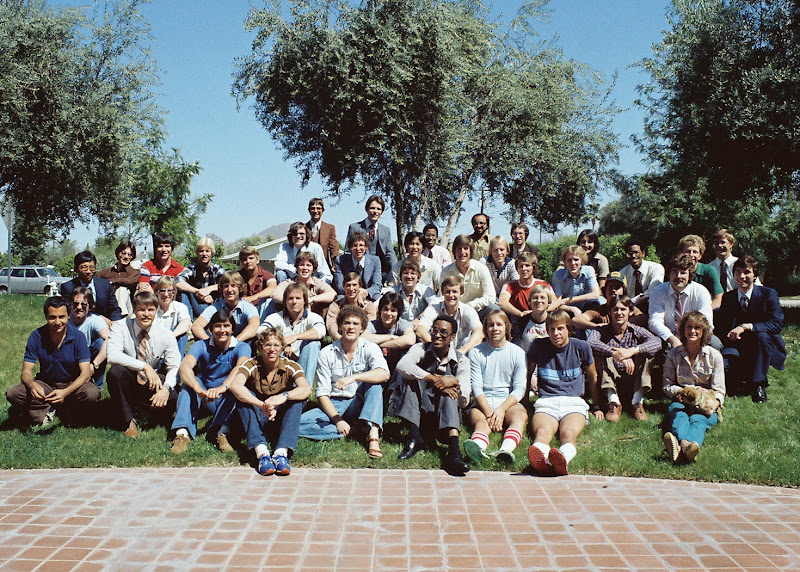
DeVry Institute of Technology, 9D Graduating Class of 1981

I wished to post this photo long ago. Yesterday, I found my classmates names, tucked into a very old "Phone Lists" folder. So, without further ado, I give you the 9D 1981 Graduating Class of DeVry Institute of Technology, in Phoenix Arizona.


1st: Reza Mahjoub, Russ Zimmerman, Curtis Kosley, Kevin Sharpley, Ken Scott, Eddie B. Collins, Bob Wiley, Gregg Syrovatka, Kelly Myers
2nd: Rob Sell, Layne Thomas, Doug Meyers, James Sorrell, Dave Markgraf, Lance Mortenson, Dan Beckman, Kurt Anderson
3rd: Jesus Abulencia, Scott Cunningham, Matt Wagner, David Page, Rob Sandberg, Mark Collins, Jim Heilig, John Sterba
4th: Markley Gordon, Mike Steinman, Thomas Hashimoto, Norm Nealy, Bob Oettinger, Tim Kiphuth, Jam Lamarre, Tom Boe, Hans Prorok
5th: Jim Howard, Mike Kandziora, Mickey Bowen, Rahim Keramat, Greg Peterson, Dan Bross, Rickey Bowen, Larry Rahm, Jim Black

Click here for additional photos.

Thursday, August 13, 2009

Murphy's Law in Machine Translation

Using machine translation, translate Murphy's Law: "Anything that can go wrong, will" to Japanese, and then back again to English. Repeat until the translation reaches equilibrium (i.e., doesn't transform to something else). The Japanese-English phrases equalize to:

仕事では?
At work?

Go to http://translationparty.com/#1374308 for more fun.

Monday, July 27, 2009

Dead and Gone


Awhile back, I lamented the dying of our four Monterey pines (Monterey Pine Death).

Alas, they are gone. A couple of weeks ago, we paid a "tree service" company to cut down the dead trunks (though the largest still had green needles on its branches), haul away the wood, and grind out the stumps.


There is now a bright emptiness in our backyard where they once stood. We are considering planting citrus trees in their place. Perhaps a lemon or lime tree.

Sunday, July 26, 2009

Putting the "No" in Innovation

A deliciously slackeresque ad from Post cereal: Putting the "No" in innovation. I particularly like Frank's recommendation of Google Earth as a good way to waste time.

See the whole series here.

Wednesday, March 25, 2009

Remote Screen Sharing on Macintosh

Here are instructions to set up and use remote Screen Sharing of a home machine from work, without having a mobileme account (previously known as dot mac, or .mac). Actual IP addresses, user names, hostnames, and domain names have been obfuscated to protect the innocent.
  1. On your home machine, enable Screen Sharing (vnc), Remote Login (ssh), and File Sharing (afp) using the System Preferences -> Sharing control panel.

  2. On your home AirPort router, reserve a fixed DHCP IP Address for your home machine using the AirPort Utility -> Internet -> DHCP -> DHCP Reservations panel. For example, I set up a DHCP reservation for my home machine with the following values:
    • Description: myMac
    • Reserve address by: MAC Address
    • MAC Address: aa:bb:cc:dd:ee:ff (this is the MAC of my iMac's network card).
    • IPv4 Address: 10.0.1.xxx

  3. On your home AirPort, enable port mapping so that ssh port 22 forwards to the fixed IP address of your home machine (e.g., 10.0.1.xxx), using AirPort Utility -> Advanced -> Port Mapping. For example, I set up a Port Mapping Service with the following values:
    • Service: Remote Login - SSH
    • Public TCP Port(s): 22
    • Private IP Address: 10.0.1.xxx
    • Private TCP Port(s): 22
    • Description: Remote Login - SSH
    • Advertise globally using Bonjour: No

  4. I'm not sure about this, but I think you have to enable NAT Port Mapping Protocol too, using AirPort Utility -> Internet panel. Set the "Enable NAT Port Mapping Protocol" check box to yes. Maybe someone will test to confirm whether this setting makes any difference.

  5. Set up a Hostname to resolve to your home external IP Address, so that in later steps you can specify the Hostname, and not need to specify the external IP address (which could change). I used DynDNS at https://www.dyndns.com to create a free Hostname under "Host Services". (Note: I also set up my machine at home to keep the entry fresh if ever my home external IP address ever changes, using the DnyDNS Updater application that I downloaded from their web site). For example, I set up a Dynamic DNS Host at their web site with the following values:
    • Hostname: hostname.dyndns.com
    • Wildcard: Yes
    • Service Type: Host with IP address
    • IP Address: gg.hh.ii.jj
    • TTL Value: 60 seconds
    • Mail Routing: No

  6. Confirm that everything works so far. From any machine run ssh .domain (e.g., ssh myhostname.dyndns.com). The ssh command will prompt you for your home machine password, and then give you shell prompt on your home machine. Yay! You may need to specify a user name for your home machine, if there is more than one user account on that machine. For example, you might have to use ssh username@myhostname.dyndyns.com, where username is the user account on that machine.

  7. Start forwarding ports. If Screen Sharing (or VNC) is running at home on port 5900, then on your work machine do ssh -C -L 1200:10.0.1.xxx:5900 username@myhostname.dyndyns.com, then run Screen Sharing (or VNC) on your work machine and point it at localhost:1200. This forwards VNC traffic over the SSH connection. To run Screen Sharing, enter vnc://localhost:1200 in your browser, or press Cmd-K in the Finder to display the Connect to Server, and enter vnc://localhost:1200 in the Server Address, and click the Connect button. Note that the -L section allows you to forward any local port to any destination IP address and port number that the destination can see, which is very powerful. Note that the -C option compresses the data sent.

  8. Shorten your command line so you can just type "ssh home" and it will find the right machine and forward the port automatically. On your work machine add a section to ~/.ssh/config like this:
    • Host home
    • HostName myhostname.dyndyns.com
    • User username
    • Compression yes
    • LocalForward 1200 10.0.1.xxx:5900

  9. Advanced Modification 1: It's a good idea to change your SSH to use a non standard port number such as 3322, instead of 22.

  10. Advanced Modification 2: Eliminate the need to enter a password each time you start ssh to your hostname, by setting up ~/.ssh/authorized_keys on your home machine.
That's it!

Monterey Pine Death

Our trees are dying.

Three Monterey Pine trees along the East fence of our property are dead, and the fourth is dying. An arborist said they were attacked by the Red Turpentine Beetle.

Monterey pines live an average of 80-90 years. Few live past 150 years. These trees would be approximately 53 years old, if they were planted when the house was built. Though a bit early, it is not unusual for Monterey Pines to die this way.

Here's a link to some photos I took last summer, when only two of the trees had died. Some photos show the small pile of wood and sap particles that the beetle pushed out the hole when it bored into the base of the trunk.

Monday, February 16, 2009

Words and Phrases from Names of Letters and Numbers

Here are some words and phrases formed by speaking the names of letters and numbers. Professor Don Colton calls these DVS words or grammagrams. He gives some brief 'rules' as to what is and is not a DVS word, which I have tried to follow here. Words followed by an asterisk (*) are near-misses -- at least for US West-Coast English speakers.

Update: I'm no longer updating this blog page. When I find new DVS words or phrases, I add them to this Google Doc.

DVS words are a class of homonyms - words that sound the same.

Words and Phrases:
1 – one, won, wan
2 – two, too, to
4 – four, for, fore
6 – six, sex,
8 – eight, ate
A – a, hey, eh
B – be, bee
C – see, sea
D – the*
F – if
G – gee
H – edge*, age*
I – I, eye, aye
K – okay
L – hell, will*, well*
M – am, them*, him*, ham*
N – an, in, and*
O – oh, owe
P – pea, pee
Q – cue, queue
R – are, or, our
S – is
T – tea, tee
U – ewe, you, hew*
X – eggs*
Y – why
2A – two-way
2L – tool
2N – tune*
2R – tour*
4A – foray
4C – foresee
4D – forty
4M – forum
4N – foreign
4T – forty
6D – sixty
6E - sexy
6S – success
6T – sixty
7D – seventy
7T – seventy
8D – eighty
8T – eighty
9D – ninety
9T – ninety
AD – eighty
AL – ale, ail
AR – air
AT – eighty
B4 – before
B9 – benign
BD – beady
BG – busy
BH – bitch*
BN – bean, being*
BZ – busy
CD – seedy
CL – seal, ceil
CN – seeing*
CQ – seek you
CR – seer
CT – city
D5 – defy
D9 – denying*
DK – decay
DL – deal
DR – dear, deer
DZ – dizzy
EA – yea!, yay
EL – eel, yell
ER – ear*, your*
ES – yes
EZ – easy
FR – ever
FX – effects
GR – jeer*
IC – icy
II – Aye-aye
IL – aisle, isle
IV – ivy
JL – jail
K9 – canine
KG – cagey
KL – kale
KR – care
L8 – elate
LO – hello
ME – Emmy
MT – empty
N2 – into
N8 – innate
NE – any
NR – inner
NS – anise*, anus*
NT – auntie*
NV – envy
NX – annex
OK – okay
OL – oil, oh well
PL – peel, peal
PR – peer*, pier*
PP – pee pee
QP – Kewpie
QT – cutie
R8 – orate*, rate*, aerate*
RG – orgy*
RT – arty
S6 – Essex
SA – essay
SX – Essex
TL – teal
TP – teepee
U8 – you wait
UA – you weigh
UH – you wage*
UL – you will, you well, yule
UR – your*, you're*
VL – veal
VU – view
XL – excel
XM – exam
XS – excess
YL – while
ZL – zeal
2BS – dubious
4CR – foreseer
4FR – forever
4N6 – forensics
4NR – foreigner
6SR – successor
6UL – sexual*
8ND – attendee
10S – Tennis
AGN – Agean
AV8 – aviate
BUT – beauty
DV8 – deviate
DVS – devious
JMN - jammin'*
KRN – caring
LMO – Alamo
LOG – elegy
MN8 – emanate
MR8 – emirate
N4S – enforce*
NDN – Indian
NE1 – anyone
NME – enemy
NRG – engery
NTT – entity
NVS – envious
ODS – odious
OP8 – opiate
OPM – opium
PNO – piano
R8R – orator
SKP – escapee
SN9 – asinine
TDS – tedious
VDO – video
XLN – excellent*
XMN – examine
XP8 – expiate
XTC – ecstasy
2M8O – tomato*
10SE – Tennesse
AV8R – aviator
DV8R – deviator
DVNC – deviancy
EDBD – itty-bitty
U4EA – euphoria*
LMN8 – eliminate
MSRE – emissary
N4SR – enforcer*
NMNE – anemone
NVDS – invidious
QS10 – question*
RKDN – Arcadian
XLNC – Excellency
XLR8 – accelerate, exhilarate
XMNR – examiner
XP8R – expiator
YLU8 – while-you-wait
CNMNE – sea anemone
LMN8R – eliminator
NSTZA – anesthesia
OBDNC – obediency*
SNTLE – essentially
XFSEO – ex officio
XLR8R – accelerator
XPDNC – expediency


Names:
B – Bea
D – Dee
J – Jay
K – Kay, Kaye
Z – Zee
BL – Beale, Bill
EN – Ian
EV – Evie
GG – Gigi
IV – Ivy
JC – JaiCi
JN – Jane
KC – Casey
KN – Cain
KT – Katie
LC – Elsie
LE – Ellie
LS – Alice, Ellis
LX – Alex
ME – Emmy
MN – Ammon
NE – Annie
NS – Innes
OB – Obi
OP – Opie
PT – Petey
RT – Artie
UG – Yugi
KRN – Karen
LSN – Allison, Ellison
MLE – Emily
MNM – Eminem
OB1 – Obi-Wan
UGO – Yu-Gi-Oh
XAVR – Xavier


Some longer phrases:
I12BA6S – I want to be a success.
4FRNFR – Forever and ever.
I1NME – I won an Emmy.
OICURMT - Oh I see you are empty
OICUR2MT4T – Oh I see you are too empty for tea.

Sunday, November 16, 2008

A Day Wasted

The following diary entries were made on the same day by Charles Francis Adams, an ambassador to Great Britain, and his son, Brooks Adams:

Charles Francis Adams: "Went fishing with my son. A day wasted."
Brooks Adams: "Went fishing with my father - the most glorious day of my life."

This reminded me to waste some time with my kids today.

Saturday, August 16, 2008

Incorrect owner flags for directoy hard link (id=xxxxxxxx)

While running Apple Disk Utility repair on my external USB drive (which I use primarily for Backup), I started getting hundreds and hundreds of warnings:

Incorrect owner flags for directoy hard link (id=xxxxxxxx)
(it should be 0x2 instead of 0x0)

where the id was a 8 digit number, like 19831030, that increased with each message. After running all night, it repair didn't seem any closer to finishing. So, I killed Disk Utility. I set the USB Drive as my startup drive (fortunately, it has OS X on it), and rebooted into safe mode (Cmd-S).

Then, I entered:
fsck_hfs -yprdf /dev/rdisk1s2

Fsck_hfs gave me similar messages, but seemed to be running faster. Indeed, it finished in about 47 minutes, with errors repaired. I ran it again, this time with no errors reported.

To finish and reboot, I entered:
shutdown -r now

After reboot, I switched the startup disk back to my built-in hard drive, and restarted. Once restarted, I ran Apple Disk Utility on the USB drive again. It found a minor error, and repaired it. Since then, it has been repairing fine.

I still have no idea why the USB drive started misbehaving. My guess is that one of the kids interrupted a backup by non-gracefully powering down the machine. Anyway, I hope this trick helps others.